ToonApp AI+ Viral Photo Maker
- 4.4
- Rating
- 100.00K
- Installs
- Free
- Price

 Analysis by App-foxy
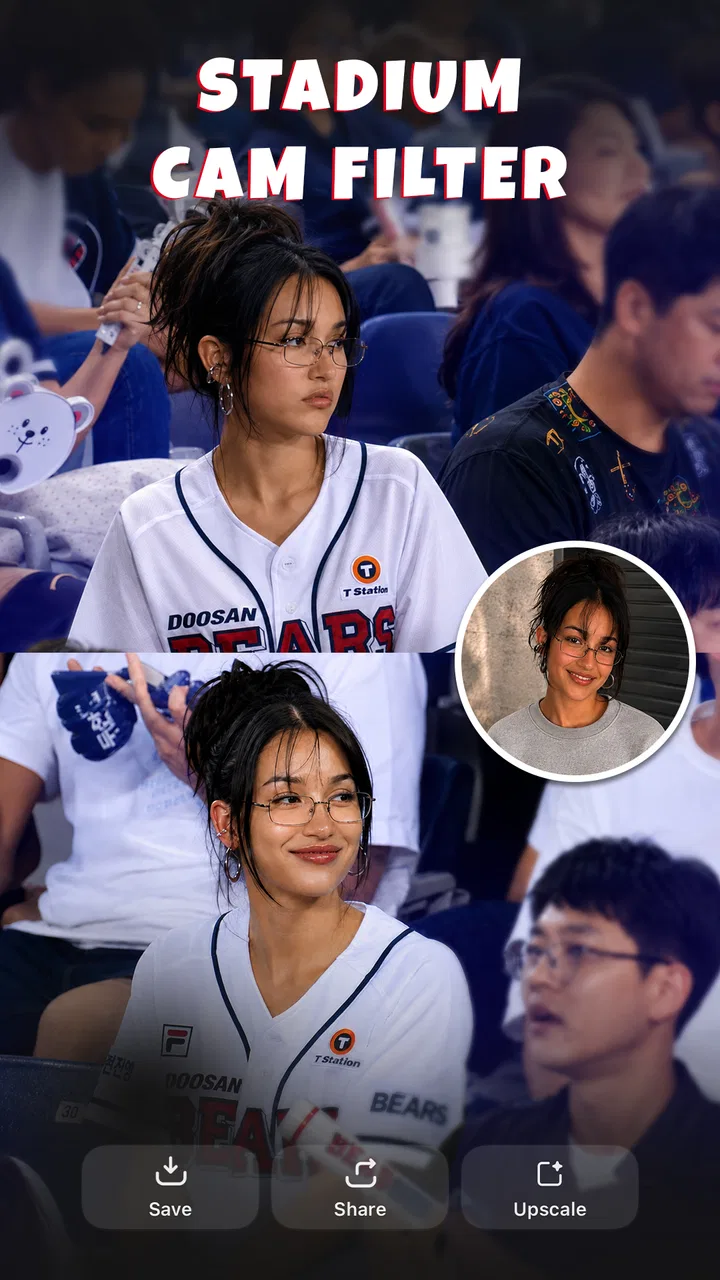
Turning an ordinary selfie into something playful is the main reason I would try ToonApp AI+ Viral Photo Maker. This photography app from Lyrebird Studio focuses on AI dance videos, caricature-style filters, and three-dimensional cartoon effects, so it is aimed less at careful photo correction and more at creating something that catches attention in a chat or social post. My first impression is that it works best as a quick creativity tool: you bring in a suitable photo, choose a visual direction, and see how far the app can transform it.
The important thing for a first-time user is to set the right expectation. This is not the kind of editor I would open when I need accurate skin tones, detailed retouching, or precise control over every adjustment. It is much closer to a playful studio of automated effects. The appeal comes from the surprise of seeing a familiar face reinterpreted, especially when the result is shared with friends. If that sounds like your kind of photography, the free download makes it easy to experiment before deciding whether the extra options are worth considering.
What to expect before making your first creation
The app is listed for Everyone, which matches its lighthearted focus. I would feel comfortable recommending it to someone who wants accessible visual effects rather than a complicated editing workspace. The current version is 1.0.11, and the app requires an operating system version of 9 or later. Its public response is encouraging, with a 4.5 average from around 1.6 thousand ratings and more than 50 thousand installs. Those figures suggest that it has found an audience, while also making it clear that it is a more focused tool than a huge all-purpose photo editor.
You May Also Like

 AccuWeather: Weather Radar
AccuWeather Review: A Quick, Clear Forecast for Everyday Decisions
For everyday plans, the best forecast is the one you can understand quickly. AccuWeather makes rain timing, radar, and local conditions easy to act on, with a few trade-offs.

 Hill Climb Racing
Why Hill Climb Racing Still Turns Crashes Into One More Run
A tiny car, a bumpy hill and one more upgrade: Hill Climb Racing keeps resurfacing because its simple chaos makes every near-miss feel personal.

 AliExpress - Shopping App
AliExpress Makes Global Shopping Feel Personal, but Shoppers Bear the Risk
AliExpress turns a global marketplace into a pocket-sized discovery engine. Its reach is useful, its shopping loop compelling, and its trade-offs easy to miss.

 Lords Mobile: Kingdom Wars
Lords Mobile Is a Kingdom-Building Routine, Not a Quick Match
A case-by-case verdict on the building, battles, device demands, and social commitments that make Lords Mobile rewarding for some players and exhausting for others.

 PDF Scanner app - TapScanner
TapScanner Makes Paperwork Easier to Capture, Check, and Share
TapScanner makes scanning with a phone feel less like a rescue operation and more like a dependable step in getting work done. Its capture tools are useful, though not flawless.

 Block Blast!
 Shows How Much a Puzzle Game Can Leave Out
A quiet grid game shows why puzzle players increasingly value instant clarity, repeatable skill and low-pressure play—and where the genre still needs to catch up.
More From Our News Desk
View All News


ToonApp AI+ is free to install, but optional purchases range from $7.99 to $69.99 per item. I would keep that in mind before becoming invested in a particular effect. A free app can still be useful without spending money, but the most attractive styles may be presented alongside paid choices. My advice is simple: explore the available workflow first, make one or two test images, and only then decide whether the paid side fits how often you will use it.
The name suggests a broad viral-photo experience, but the actual strength is the combination of cartoon treatment and motion-oriented creativity. The store summary highlights AI dance videos, caricature filters, and 3D cartoons. In practical terms, that means the app is more interesting when you choose a photo with a clear subject and a strong expression. A dark, distant, or crowded image gives the transformation less to work with and can make the result feel less convincing.
I also recommend treating the first result as a draft rather than a final answer. AI effects often make a creative decision on your behalf, and the most entertaining result is not always the most natural-looking one. A slightly exaggerated face may be perfect for a joke between friends, while the same image could feel unsuitable for a professional profile. Knowing that difference before you start prevents disappointment.
Choosing the right photo saves more time than changing effects
For a first attempt, I would choose a recent portrait with one clearly visible face, even lighting, and a simple background. A shoulders-up image is usually a better starting point than a full group photograph because the app can concentrate on the person you want to transform. If you want a caricature or cartoon result, a recognizable expression can be more valuable than a perfectly posed selfie.
There is a useful trade-off here. A clean portrait gives the AI a better chance of producing a coherent face, but a slightly unusual expression may produce a more memorable result. I would keep both kinds of photos available: one predictable image for learning the interface and one expressive image for the fun experiment. This two-step approach is more efficient than repeatedly changing settings while wondering whether the problem is the effect or the source picture.
For dance-oriented creations, I would be even more selective. A photo where the person is visible and not cut off by the frame gives the app a clearer starting point for a motion concept. I would not use a tiny face in a landscape shot as my first test. The goal is not to create the most ambitious piece immediately; it is to get one result that makes the workflow understandable.
Getting through setup without feeling lost
After installing the app, I would begin by looking for the main creation path rather than opening every category. The feature list can sound broad, especially when dance videos, caricatures, and 3D cartoons are presented together. Starting with one still-photo effect is less intimidating because it gives you a quick way to understand how the app handles image selection and style choices.
When the image picker appears, choose a photo deliberately instead of tapping the first recent image. This small decision matters more here than it does in a basic crop editor. Look for a face that is large enough to recognize, avoid heavy obstruction around the eyes and mouth, and use a photo that you are comfortable transforming. If you are testing the app with a friend’s picture, ask permission before sharing the result, particularly if the effect makes the person look deliberately silly.
The first setup is also a good moment to notice which parts of the experience are immediately available and which ones are connected to optional purchases. I would not assume that every visible style is included simply because the app itself is free. Instead, I would tap through the choices carefully and learn how the app distinguishes its accessible tools from its paid items. That habit avoids accidental surprises and helps you judge the free experience fairly.
One practical tip is to keep the original photo untouched. Make a duplicate if you plan to crop or prepare the image elsewhere, and do not overwrite your camera copy with a stylized version. This is especially useful when you want to compare several looks. The cartoon result may be entertaining, but you may later prefer the original for another purpose.
The quickest route to a meaningful first success
For my first meaningful test, I would use a straightforward portrait and choose a caricature or cartoon treatment before attempting a dance video. A still image gives immediate feedback and makes it easier to tell whether the face, pose, and overall style are working together. Once you have a result you actually like, you have a reference point for judging the more animated options.
Do not judge the app only by whether the result looks realistic. The point of a caricature is often to exaggerate. I would ask three questions instead: does the person remain recognizable, does the effect match the mood of the photo, and would I genuinely send this to someone? If the answer to two of those questions is yes, the experiment has already succeeded.
A useful workflow is to test the same photo with two contrasting styles rather than testing two unrelated photos with one style each. That makes the comparison clearer. You can see whether the app is responding well to the source image or whether one particular effect simply suits your face better. It also helps you avoid mistaking a weak photo for a weak feature.
Once you have a still image that works, move to the AI dance-video area with modest expectations. The appeal is the change from a static portrait to a more shareable motion concept, but the result may feel more artificial than a cartoon still. That is not automatically a flaw; it is part of the playful style. I would use these creations for casual sharing, jokes, and trend participation rather than expecting polished video production.
The strongest everyday scenario is a group chat. Imagine a friend sending a familiar selfie before a birthday, trip, or weekend gathering. I would run that image through a caricature style, save the version that best preserves the person’s recognizable features, and send it as a light joke. If the group is comfortable with that kind of humor, the app turns a normal photo into a small shared moment without requiring editing experience.
Common confusion around style, quality, and sharing
One point that can confuse new users is the difference between a filter and a full reinterpretation. A conventional filter usually changes color, contrast, or atmosphere while leaving the face mostly alone. The cartoon and caricature tools here are more ambitious: they may alter proportions, facial details, and the overall visual identity. If you want a subtle enhancement, this can feel too strong. If you want a recognizable person turned into a comic character, that same boldness is the reason to use it.
Another source of confusion is expecting every result to be equally good. AI-based effects depend heavily on the image you provide. Glasses, hair across the face, unusual angles, multiple people, and low visibility can all make a transformation less appealing. I would not immediately conclude that the app has failed. First try a clearer portrait, then compare the result. This is one of the most important practical lessons for getting value from the app.
You may also wonder whether the app replaces a normal photo editor. In my view, it does not. A traditional editor is better when you want to straighten a horizon, remove a distracting object, adjust exposure, or prepare an image for a specific format. ToonApp AI+ is better when the main question is, “What would this person look like as a cartoon or inside a playful animated concept?” They overlap in photography, but they solve different problems.
Compared with a standard cartoon filter, this app’s wider focus on AI dance videos and three-dimensional cartoon looks gives it more entertainment value. Compared with a full professional editor, it sacrifices fine control for speed. Compared with manually drawing a caricature, it is dramatically easier to start, although the result is less personal and less controllable. That trade-off is exactly where the app makes sense: quick visual experiments rather than carefully authored artwork.
Privacy and consent should also be part of your normal workflow. A face is not just another texture, and a funny transformation can still embarrass someone if shared without permission. I would use my own photos first, ask before processing someone else’s image, and think about the audience before posting a result publicly. This is not a limitation unique to the app, but the more dramatic the effect, the more important that judgment becomes.
There is a second sharing issue: keep the difference between a private test and a finished post in mind. A result can look amusing on a phone screen but less effective when viewed larger, or it may need a crop before fitting a social feed. I would inspect the complete image before sending it and avoid adding several effects in a row just because they are available. One clear visual idea is usually stronger than a crowded chain of transformations.
How to decide whether the paid options are worthwhile
Because the app is free with in-app purchases, I would evaluate it by frequency of use rather than by the number of effects I can open on the first day. If you only want a one-time joke or a single cartoon portrait, the free experience may be enough. If you regularly create themed images, enjoy trying new visual treatments, and find yourself returning to the app, a paid item may feel more reasonable.
I would be cautious about paying simply to rescue a poor result. If the source photo is unsuitable, unlocking another style may not solve the underlying problem. Try a better portrait first. This is a non-obvious but important saving: image selection often has a bigger effect on satisfaction than adding more choices.
The listed purchase range runs from $7.99 to $69.99 per item, so the upper end is not a casual decision for occasional use. I would read the purchase screen carefully and consider whether the feature will serve a repeated purpose. Someone who creates social content frequently may see more value than someone who opens the app once every few months. Either way, the free starting point makes that decision easier to postpone until you understand your own habits.
Who should install it, and who should choose something else
I think this app is a good fit for people who want fast, expressive results without learning layers, masks, brushes, or complicated timelines. It is particularly suitable for playful selfies, birthday surprises, profile experiments, casual social posts, and people who enjoy seeing familiar faces reimagined. The Everyone content rating also makes its general audience broad, although responsible sharing still matters.
I would recommend skipping it if your priority is natural portrait retouching, professional color work, precise facial editing, or dependable control over every visible detail. A conventional photo editor will be the better choice for those jobs. I would also look elsewhere if you need a serious video-editing environment with detailed timing and manual animation control. The AI dance concept is appealing because it is quick, not because it gives you the same control as a dedicated production tool.
People with limited storage or patience for trial-and-error should also think about their expectations. Creative AI tools are most enjoyable when you are willing to test a few photos and accept that some attempts will be weaker than others. If you want every image to look consistent on the first try, the app may feel unpredictable. That unpredictability is part of the fun for some users and a genuine drawback for others.
My next-step workflow after the first successful image
After making one result I liked, I would create a small personal routine: save the original, note which kind of portrait worked, try one contrasting style, and only then explore the animated option. This gives you a repeatable path instead of randomly tapping through effects. Over time, you will learn whether your best results come from close portraits, expressive faces, or a particular visual direction.
I would also separate experimentation from publishing. Make several versions privately, choose the one that remains recognizable and visually clean, and share only that version. This is especially helpful with caricatures, where a funny exaggeration can quickly become too extreme. The best result is not necessarily the most distorted one; it is the one that communicates the joke or mood without losing the person entirely.
For anyone deciding whether to keep the app installed, the answer should come from that first successful action. If turning one ordinary portrait into a convincing, amusing cartoon makes you want to try another, ToonApp AI+ has earned a place among your casual photography tools. If you mainly wanted a polished editor or a predictable filter, you will probably get more from a traditional alternative.
My overall view is positive but specific: this is a focused, entertaining app rather than an all-purpose photography solution. Lyrebird Studio has built its appeal around quick AI transformations, and the combination of caricatures, 3D cartoon styling, and dance-oriented creations gives beginners an approachable way to make something different. Start with a clear portrait, test the free path carefully, and treat each result as a creative draft rather than a guaranteed finished image. That mindset brings out the app’s strengths while keeping its limitations easy to manage.
FAQs for ToonApp AI+ Viral Photo Maker
01What is ToonApp AI+ Viral Photo Maker and how does it work?
ToonApp AI+ Viral Photo Maker is a mobile application that transforms your photos into cartoon-like images using advanced AI technology. By selecting a photo from your gallery or taking a new one, the app applies artistic filters and effects to create a unique, animated version of your picture. It's designed to be user-friendly, making it accessible to everyone.
02Is ToonApp AI+ free to use, or are there in-app purchases?
ToonApp AI+ offers a free version with basic features, allowing you to try out the cartoon transformation process. However, there are in-app purchases available for users who wish to access premium features, such as exclusive filters and effects, or to remove ads. This gives users flexibility in choosing the level of functionality they desire.
03Does ToonApp AI+ require an internet connection to function?
Yes, ToonApp AI+ generally requires an internet connection as it relies on cloud-based AI processing to apply effects to your photos. This ensures higher quality transformations and up-to-date features. However, basic functionality might be available offline, but with limited access to certain features.
04How does ToonApp AI+ handle user privacy and data security?
ToonApp AI+ is committed to user privacy and data security. The app only accesses photos that you choose to upload and does not store personal data without consent. It complies with standard privacy regulations and provides options for users to manage their data. Always review the app's privacy policy for detailed information.
05What devices are compatible with ToonApp AI+ Viral Photo Maker?
ToonApp AI+ is compatible with both Android and iOS devices. It supports a wide range of smartphones and tablets, ensuring that most users can enjoy its features. For optimal performance, it’s recommended to use the app on devices with the latest operating system updates. Always check the app store for specific device compatibility.
Pros
- Easy-to-use interface for quick edits.
- Variety of cartoon styles available.
- Fast rendering of images.
- Regular updates with new features.
- Lightweight and doesn't drain battery.
Cons
- Limited free features without subscription.
- Occasional ads may interrupt workflow.
- Requires strong internet for best results.
- Limited customization for advanced users.
- Some filters may look similar to each other.

ToonApp AI+ Viral Photo Maker
Gallery